About SKIIID
SKIIID is a percussion synthesizer built for real-time performance. Four pads. Each one is a sound sculpted by where your finger lands. Move left or right to morph between synth parameters. Move up or down to control...
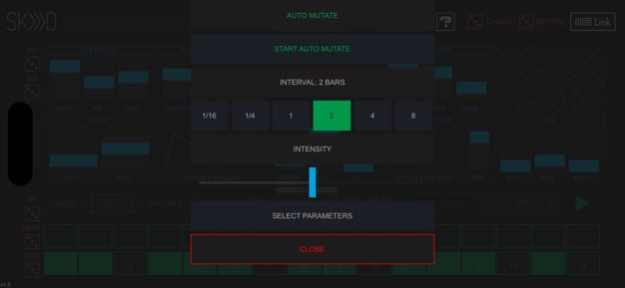
SKIIID is a percussion synthesizer built for real-time performance. Four pads. Each one is a sound sculpted by where your finger lands. Move left or right to morph between synth parameters. Move up or down to control velocity. Simple to play, deep to explore. - PADS - Four independent drum voices. Each pad morphs between parameter extremes based on X-axis position. Velocity is Y-axis. - STEP SEQUENCER - 16-step sequencer per pad. Variable step length for polyrhythms. Reverse playback, shuffle, pin and random step modes. Sync to Ableton Link or run free. - AUTO-MUTATE - Evolves your sound automatically. Individual interval and intensity per pad, synced to tempo. - CHAOS ENGINE - RANDOM, CHAOS, and MUTATE modes generate new sounds instantly. - AUv3 PLUGIN - Run SKIIID inside AUM, ApeMatrix, Audiobus, or any AUv3 host. Multiple instances work independently - different patches, different sequencers, no shared state. - MIDI - MIDI In for pad triggering. MIDI Learn for external controller mapping. Ableton Link for tempo sync. - WORKS ON - iPhone and iPad, all modern screen sizes. Landscape mode.
Version History • Fixed MIDI Learn — CC mapping now works correctly with hardware controllers in standalone mode • Fixed sequencer OPTIONS popup — step count, direction, and shuffle changes now take effect immediately • Fixed AUv3 MIDI input — MIDI notes now correctly trigger pads in the Audio Unit plugin. • AUv3 layout overhaul — Redesigned the Audio Unit layout to look sharp and consistent across all iPads and iPhones. No more tiny or oversized UI in different hosts. • Optimized canvas scaling — The AUv3 now renders at native resolution in GarageBand and scales up cleanly in larger hosts like AUM. • Fullscreen support — Hosts that support fullscreen AU views (like GarageBand's expand button) now work correctly. • Tested on all devices — Verified layout on 19 simulators covering iPad Pro, iPad Air, iPad mini, iPad 9th gen, and iPhones from iPhone 11 through iPhone 17 Pro Max. 1.5.4 Apr 10 • Fixed sequencer OPTIONS popup — step count, direction, and shuffle changes now take effect immediately • Fixed AUv3 MIDI input — MIDI notes now correctly trigger pads in the Audio Unit plugin. • AUv3 layout overhaul — Redesigned the Audio Unit layout to look sharp and consistent across all iPads and iPhones. No more tiny or oversized UI in different hosts. • Optimized canvas scaling — The AUv3 now renders at native resolution in GarageBand and scales up cleanly in larger hosts like AUM. • Fullscreen support — Hosts that support fullscreen AU views (like GarageBand's expand button) now work correctly. • Tested on all devices — Verified layout on 19 simulators covering iPad Pro, iPad Air, iPad mini, iPad 9th gen, and iPhones from iPhone 11 through iPhone 17 Pro Max. 1.5.3 Apr 6 • Fixed AUv3 MIDI input — MIDI notes now correctly trigger pads in the Audio Unit plugin. • AUv3 layout overhaul — Redesigned the Audio Unit layout to look sharp and consistent across all iPads and iPhones. No more tiny or oversized UI in different hosts. • Optimized canvas scaling — The AUv3 now renders at native resolution in GarageBand and scales up cleanly in larger hosts like AUM. • Fullscreen support — Hosts that support fullscreen AU views (like GarageBand's expand button) now work correctly. • Tested on all devices — Verified layout on 19 simulators covering iPad Pro, iPad Air, iPad mini, iPad 9th gen, and iPhones from iPhone 11 through iPhone 17 Pro Max. 1.5.2 Apr 3 • AUv3 layout overhaul — Redesigned the Audio Unit layout to look sharp and consistent across all iPads and iPhones. No more tiny or oversized UI in different hosts. • Optimized canvas scaling — The AUv3 now renders at native resolution in GarageBand and scales up cleanly in larger hosts like AUM. • Fullscreen support — Hosts that support fullscreen AU views (like GarageBand's expand button) now work correctly. • Tested on all devices — Verified layout on 19 simulators covering iPad Pro, iPad Air, iPad mini, iPad 9th gen, and iPhones from iPhone 11 through iPhone 17 Pro Max. 1.5.1 Apr 1 Version 1.5 is a major rewrite. • Full AUv3 plugin support — run multiple instances independently in AUM, ApeMatrix, or any AUv3 host • Each instance has its own sound, sequencer, and presets — no shared state • Rebuilt layout for all modern iPhone and iPad screen sizes • Sequencer: shuffle, reverse playback, variable step length per pad for polyrhythms, pin and random modes • Auto-Mutate — evolves your sound automatically, individual interval and intensity per pad, synced to tempo • MIDI In + MIDI Learn — trigger pads and map external controllers to parameters • Ableton Link — improved sync, fully working • Randomizer fully functional 1.5 Mar 31 fixed export (garageband, nanostudi 2 etc) 1.18 10/15/2020 fixed: - step-sequencer and step-selectionstep - default states for tempo and step-selection 1.17 09/27/2020 added iphone-support added step-length-selection 1.16 09/24/2020 fixed minor graphical issues 1.15 09/06/2020 fixed crash when using +/- note buttons 1.14 09/04/2020 fixed some graphical issues for ipad 11/12.9 inch 1.13 09/02/2020 fixed: crashing in standalone-mode when using pads with 12.9 inch Ipads changed: pad sizes on 11-inch Ipads 1.12 08/27/2020 fixed: crashing when using pads In Auv3 with 12.-inch Ipads internal sequencer play/stop not working when disabling "sync" 1.11 08/23/2020 SKIIID-Update with AUv3-Support 1.1 08/20/2020 improved sound and randomizing feature 1.06 07/28/2020 Fixed: Ableton Link - Support 1.05 07/27/2020 fixed: - step labels not showing loaded preset-names - random-preview - Volume Velocity changed: - improved Sub FM OSC - change of parameters only possible when step is selected. 1.04 07/24/2020 fixed: randomizing changed sounds but not sliders in sequencer-mode minor graphical issues changed: tweaking random-values added: velocity for midi in pads are flashing when "midi in" is active sequencer start/stop and tempo-selection appear now in pad-mode as well 1.03 07/19/2020 - SEQUENCER updated with new functionality - ABLETON LINK start/stop implemented - MIDI IN from DAW, virtual midi and Hosts (like AUM) - HELP SECTION now online (reachable with bigger ?-button now) 1.02 07/13/2020 added Audiobus and IAA - Support minor bugfixes 1.01 07/08/2020 1.0 07/03/2020
Previous Versions
Here you can find the changelog of SKIIID since it was posted on our website on 2021-10-03 17:13:11.
The latest version is 1.5.4 and it was updated on 2026-10-10 11:02:34. See below the changes in each version.
SKIIID version 1.5.4
Updated At: 2026-10-08
Changes: Version History • Fixed MIDI Learn — CC mapping now works correctly with hardware controllers in standalone mode
• Fixed sequencer OPTIONS popup — step count, direction, and shuffle changes now take effect immediately
• Fixed AUv3 MIDI input — MIDI notes now correctly trigger pads in the Audio Unit plugin.
• AUv3 layout overhaul — Redesigned the Audio Unit layout to look sharp and consistent across all iPads and iPhones. No more tiny or oversized UI in different hosts.
• Optimized canvas scaling — The AUv3 now renders at native resolution in GarageBand and scales up cleanly in larger hosts like AUM.
• Fullscreen support — Hosts that support fullscreen AU views (like GarageBand's expand button) now work correctly.
• Tested on all devices — Verified layout on 19 simulators covering iPad Pro, iPad Air, iPad mini, iPad 9th gen, and iPhones from iPhone 11 through iPhone 17 Pro Max. 1.5.4 Apr 10 • Fixed sequencer OPTIONS popup — step count, direction, and shuffle changes now take effect immediately
• Fixed AUv3 MIDI input — MIDI notes now correctly trigger pads in the Audio Unit plugin.
• AUv3 layout overhaul — Redesigned the Audio Unit layout to look sharp and consistent across all iPads and iPhones. No more tiny or oversized UI in different hosts.
• Optimized canvas scaling — The AUv3 now renders at native resolution in GarageBand and scales up cleanly in larger hosts like AUM.
• Fullscreen support — Hosts that support fullscreen AU views (like GarageBand's expand button) now work correctly.
• Tested on all devices — Verified layout on 19 simulators covering iPad Pro, iPad Air, iPad mini, iPad 9th gen, and iPhones from iPhone 11 through iPhone 17 Pro Max. 1.5.3 Apr 6 • Fixed AUv3 MIDI input — MIDI notes now correctly trigger pads in the Audio Unit plugin.
• AUv3 layout overhaul — Redesigned the Audio Unit layout to look sharp and consistent across all iPads and iPhones. No more tiny or oversized UI in different hosts.
• Optimized canvas scaling — The AUv3 now renders at native resolution in GarageBand and scales up cleanly in larger hosts like AUM.
• Fullscreen support — Hosts that support fullscreen AU views (like GarageBand's expand button) now work correctly.
• Tested on all devices — Verified layout on 19 simulators covering iPad Pro, iPad Air, iPad mini, iPad 9th gen, and iPhones from iPhone 11 through iPhone 17 Pro Max. 1.5.2 Apr 3 • AUv3 layout overhaul — Redesigned the Audio Unit layout to look sharp and consistent across all iPads and iPhones. No more tiny or oversized UI in different hosts.
• Optimized canvas scaling — The AUv3 now renders at native resolution in GarageBand and scales up cleanly in larger hosts like AUM.
• Fullscreen support — Hosts that support fullscreen AU views (like GarageBand's expand button) now work correctly.
• Tested on all devices — Verified layout on 19 simulators covering iPad Pro, iPad Air, iPad mini, iPad 9th gen, and iPhones from iPhone 11 through iPhone 17 Pro Max. 1.5.1 Apr 1 Version 1.5 is a major rewrite.
• Full AUv3 plugin support — run multiple instances independently in AUM, ApeMatrix, or any AUv3 host
• Each instance has its own sound, sequencer, and presets — no shared state
• Rebuilt layout for all modern iPhone and iPad screen sizes
• Sequencer: shuffle, reverse playback, variable step length per pad for polyrhythms, pin and random modes
• Auto-Mutate — evolves your sound automatically, individual interval and intensity per pad, synced to tempo
• MIDI In + MIDI Learn — trigger pads and map external controllers to parameters
• Ableton Link — improved sync, fully working
• Randomizer fully functional 1.5 Mar 31 fixed export (garageband, nanostudi 2 etc) 1.18 10/15/2020 fixed:
- step-sequencer and step-selectionstep
- default states for tempo and step-selection 1.17 09/27/2020 added iphone-support
added step-length-selection 1.16 09/24/2020 fixed minor graphical issues 1.15 09/06/2020 fixed crash when using +/- note buttons 1.14 09/04/2020 fixed some graphical issues for ipad 11/12.9 inch 1.13 09/02/2020 fixed: crashing in standalone-mode when using pads with 12.9 inch Ipads
changed: pad sizes on 11-inch Ipads 1.12 08/27/2020 fixed:
crashing when using pads In Auv3 with 12.-inch Ipads
internal sequencer play/stop not working when disabling "sync" 1.11 08/23/2020 SKIIID-Update with AUv3-Support 1.1 08/20/2020 improved sound and randomizing feature 1.06 07/28/2020 Fixed: Ableton Link - Support 1.05 07/27/2020 fixed:
- step labels not showing loaded preset-names
- random-preview
- Volume Velocity
changed:
- improved Sub FM OSC
- change of parameters only possible when step is selected. 1.04 07/24/2020 fixed:
randomizing changed sounds but not sliders in sequencer-mode
minor graphical issues
changed:
tweaking random-values
added:
velocity for midi in
pads are flashing when "midi in" is active
sequencer start/stop and tempo-selection appear now in pad-mode as well 1.03 07/19/2020 - SEQUENCER updated with new functionality
- ABLETON LINK start/stop implemented
- MIDI IN from DAW, virtual midi and Hosts (like AUM)
- HELP SECTION now online (reachable with bigger ?-button now) 1.02 07/13/2020 added Audiobus and IAA - Support
minor bugfixes 1.01 07/08/2020 1.0 07/03/2020
SKIIID version 1.18
Updated At: 2020-10-15
Changes: Oct 15, 2020 Version 1.18
fixed export (garageband, nanostudi 2 etc)
SKIIID version 1.18
Updated At: 2020-10-15
Changes: fixed export (garageband, nanostudi 2 etc)
Disclaimer
Official App Store Link
We do not host SKIIID on our servers. We did not scan it for viruses, adware, spyware or other type of malware. This app is hosted by Apple and passed their terms and conditions to be listed there. We recommend caution when installing it.
The App Store link for SKIIID is provided to you by apps112.com without any warranties, representations or guarantees of any kind, so access it at your own risk.
If you have questions regarding this particular app contact the publisher directly. For questions about the functionalities of apps112.com contact us.